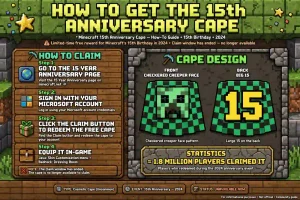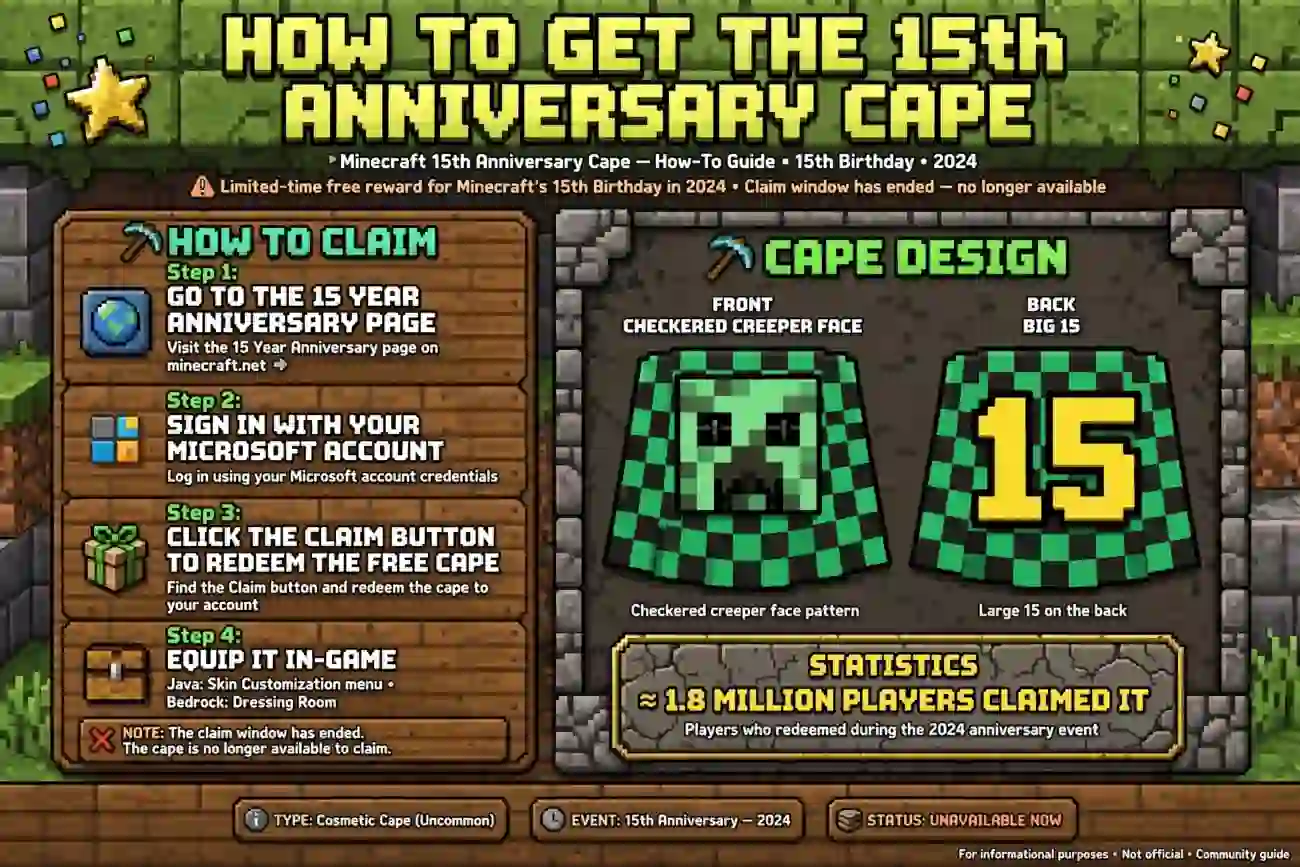
To get the Minecraft 15th Anniversary Cape, players originally had to sign in to Minecraft.net and claim the free green Creeper-themed cape during the game’s 15th anniversary celebration in May 2024.
However, the original claim page was removed on June 21, 2024. As of October 2026, there is no confirmed official method to claim this specific cape for the first time.
Key Takeaways
- The 15th Anniversary Cape features a green checkered design, a Creeper face, and the number 15.
- Minecraft originally offered the cape for free through its official website in May 2024.
- The original claiming opportunity ended in June 2024.
- Players who claimed the cape earlier should check their account and cape settings.
- The MCC 15th Year Cape is a different reward with a red-and-gold design.
Minecraft+2
What Is the Minecraft 15th Anniversary Cape?
The Minecraft 15th Anniversary Cape is a special cosmetic item released to celebrate 15 years of Minecraft. The game officially celebrates its birthday on May 17, marking the original release of Cave Game in 2009.

The cape has a distinctive light-green checkered pattern, a Creeper face on the front, and a large number 15 on the back. It was offered as a free reward during the anniversary celebration, allowing eligible players to show their support for the game.
Unlike ordinary character clothing, a Minecraft cape is a special cosmetic that appears on a player’s character. It does not provide extra health, speed, damage, or other gameplay advantages.
The original giveaway supported both Minecraft Java Edition and Bedrock Edition. Players who successfully claimed the reward could use it with their eligible game profile.
Minecraft
+1
Can You Still Get the 15th Anniversary Cape in 2026?
No confirmed official claiming method is currently available for new players. The original cape promotion launched on May 17, 2024, and the claim section was removed from Minecraft.net on June 21, 2024.
This means that visiting the old anniversary page today does not guarantee that you can unlock the cape. If you missed the original giveaway, you should not expect to receive it simply by signing in or downloading Minecraft.
Here is a quick timeline:
| Date | What happened |
|---|---|
| May 17, 2024 | The 15th Anniversary Cape became available to claim. |
| June 21, 2024 | The original claim section was removed. |
| October 2026 | The original giveaway has ended, with no confirmed new claiming opportunity. |
Minecraft
+1
If you claimed the cape during the promotion, check your account before assuming it is lost. If you did not claim it, keep an eye on official Minecraft announcements for future cosmetic rewards.
How to Get the 15th Anniversary Cape
The steps depend on whether you claimed the reward during the original event.
If you claimed the green Creeper cape before the promotion ended, follow these steps to check whether it is available on your account.
- Visit the official Minecraft website.
- Sign in using the Microsoft account associated with your Minecraft profile.
- Open Minecraft Java Edition or Bedrock Edition, depending on where you want to use the cape.
- Open your skin or character customization settings.
- Look for the 15th Anniversary Cape in the available cape options.
- Select the cape and save or apply your character settings.
If the cape was successfully claimed and is linked to the account you are using, these steps should help you locate and equip it. Menu names may vary depending on the edition and platform.
If You Never Claimed the Cape
If you missed the 2024 promotion, there is no verified way to claim the original reward through its former giveaway page.
Avoid websites that promise an instant unlock through a third-party download, modified launcher, or suspicious redemption code. These offers may be misleading or put your account at risk.
Instead, check the official Minecraft website and its announcements for newly released capes. A future promotion might offer another reward, but that does not mean the original 15th Anniversary Cape will return.
How to Equip the Cape in Minecraft
Once a cape is associated with your account, you may need to select it manually. The process differs between Java Edition and Bedrock Edition.
Java Edition
Follow these steps to equip an available cape in Minecraft Java Edition:
- Open the Minecraft Launcher.
- Select Minecraft: Java Edition.
- Open the Skins tab.
- Select the skin you want to use.
- Open the skin’s editing options.
- Choose the desired cape if it appears in the available options.
- Save the changes and launch the game.
If you do not see the 15th Anniversary Cape, make sure you are using the correct Microsoft account. Also check that you are editing the intended skin profile.
Bedrock Edition
In Bedrock Edition, capes can be managed through the character customization interface.
- Launch Minecraft Bedrock Edition.
- Open the Dressing Room from the main menu.
- Select the character you want to customize.
- Open the character editor.
- Find the cape or back-item customization options.
- Select the cape if it is available.
- Return to the game and check your character.
The Dressing Room is part of Bedrock Edition’s character customization system. Not every cosmetic item is available on every account, so the list you see depends on your unlocked items and account access.
Minecraft Wiki
+1
15th Anniversary Cape vs. MCC 15th Year Cape
Players sometimes confuse these two rewards because both celebrate Minecraft’s 15th anniversary. However, their designs and original unlocking methods were different.

15th Anniversary Cape
Green and checkered, with a Creeper face and the number 15.

MCC 15th Year Cape
Red background with gold decoration, a crown, and a white 15.
| Feature | 15th Anniversary Cape | MCC 15th Year Cape |
|---|---|---|
| Appearance | Green Creeper design | Red and gold design |
| Original method | Claim on Minecraft.net | Complete 15 event challenges |
| Event period | May–June 2024 | July–August 2024 |
| Main requirement | Claim during the promotion | Complete the MCC anniversary event |
| Available in both editions | Yes | Yes |
The MCC 15th Year Cape was earned by completing 15 challenges during the MCC x Minecraft 15th Anniversary Party. That event also ended in 2024, so its original challenge-based unlock is no longer available.
Minecraft Wiki
+1
Knowing the difference can save you time when looking for guides. A tutorial for the MCC cape will not unlock the green Creeper cape, and vice versa.
Why Is Your Anniversary Cape Not Showing?
If you believe you already claimed the cape but cannot find it, try these checks before contacting support.
- Check your Microsoft account: Make sure you signed in with the account you used when claiming the reward.
- Check the correct edition: Look in Java Edition’s skin settings or Bedrock Edition’s Dressing Room, depending on where you play.
- Restart the game: Close and reopen Minecraft to refresh the displayed cosmetic items.
- Check your profile: If you use multiple game profiles or skins, make sure you are editing the correct one.
- Allow for account synchronization: If the item was claimed recently or your account has changed, allow time for your profile to update.
If you still cannot find a cape you previously claimed, visit the official Minecraft Help Center for account-specific assistance.
Remember that these troubleshooting steps cannot grant a cape that was never claimed during the original promotion.
Are There Other Ways to Get Minecraft Capes?
Yes, Minecraft has offered different capes through special events, promotional campaigns, and other official activities. Their availability depends on the specific reward and its requirements.
For example, some past rewards required players to participate in online events, watch eligible livestreams, or complete challenges. Other promotions used official account-linked claiming processes.
To look for legitimate opportunities:
- Check Minecraft’s official news and announcements.
- Read the complete requirements for each promotion.
- Confirm the deadline and supported game editions.
- Use only the official claiming or redemption process described by the promotion.
- Verify that the reward is associated with your correct account.
You can start with the official Minecraft website to find news about new rewards and game events.
Do not assume that every Minecraft cape is free or permanently available. Each reward has its own rules, and some limited-time capes cannot be earned after their events end.
Frequently Asked Questions
1. How do you get the 15th Anniversary Cape in Minecraft?
The original method was to sign in to Minecraft.net and claim the free green Creeper cape during the 2024 anniversary celebration. That promotion ended, and the original claim section was removed in June 2024. New players should check official Minecraft announcements for any future availability.
2. Can you still get the 15th Anniversary Cape in 2026?
There is no confirmed official method to claim this specific cape for the first time as of October 2026. If you already claimed it, check the cape options linked to your account. If you missed the promotion, be cautious of third-party websites promising to unlock it.
3. Is the 15th Anniversary Cape available in Java and Bedrock?
Yes. The original reward was made available for both Minecraft Java Edition and Bedrock Edition. Players who claimed it can check Java’s skin settings or Bedrock’s Dressing Room to see whether it is available on their account.
4. Can you get the anniversary cape for free?
The original 15th Anniversary Cape was free to claim during its official promotion. However, the claim period has ended. A website asking for payment to unlock the original reward is not the official claiming method described in Minecraft’s anniversary announcement.
5. Is the 15th Anniversary Cape the same as the MCC 15th Year Cape?
No. The 15th Anniversary Cape has a green Creeper-themed design and was claimed on Minecraft.net. The MCC 15th Year Cape has a red-and-gold design and was earned by completing 15 challenges in the 2024 MCC anniversary event.
6. Can you download a Minecraft cape to unlock it?
Downloading an image or cape texture does not officially grant an account-linked cape. Avoid unofficial tools that request your password or promise to add exclusive capes instantly. Use Minecraft’s official customization options and account systems instead.
Final Thoughts
If you are searching for how to get 15th aniversary cape in Minecraft, the most important thing to know is that the original giveaway ended in 2024.
The green Creeper-themed cape was free during the celebration, but there is no confirmed official way to claim it for the first time in October 2026.
If you claimed it earlier, check your Microsoft account and the appropriate cape settings for your game edition.
Otherwise, watch official Minecraft announcements for future cosmetic rewards, and avoid unofficial unlock offers that could put your account at risk.